Production Genius:
Film Production Management
Production Tools Built for Everyone Except Producers
Film and video production involves hundreds of people, thousands of assets, and constantly shifting variables — budgets, scripts, locations, schedules, cast availability, weather. The tools the industry uses to manage this complexity were built for other industries. Project management platforms like Asana and ClickUp don't know what a call sheet is. Asset management tools like Dropbox store files but can't connect a video clip to the scene it belongs to, the script page it references, or the shoot day it was captured on.
The result is a production team running a million-dollar operation across twelve disconnected apps. The director can't see whether a scene's props are ready. The producer can't see whether the budget is tracking. The crew member can't find the call sheet for tomorrow's shoot without searching three different apps and an email thread.
Production Genius was designed to put everything — scripts, scenes, cast, crew, media assets, schedules, budgets, and communication — in one place, built specifically for how productions actually work. Not a generic project management tool with a film skin. A platform that understands the relationships between a scene, the script page it comes from, the actors in it, the shoot day it's scheduled for, and the footage captured.
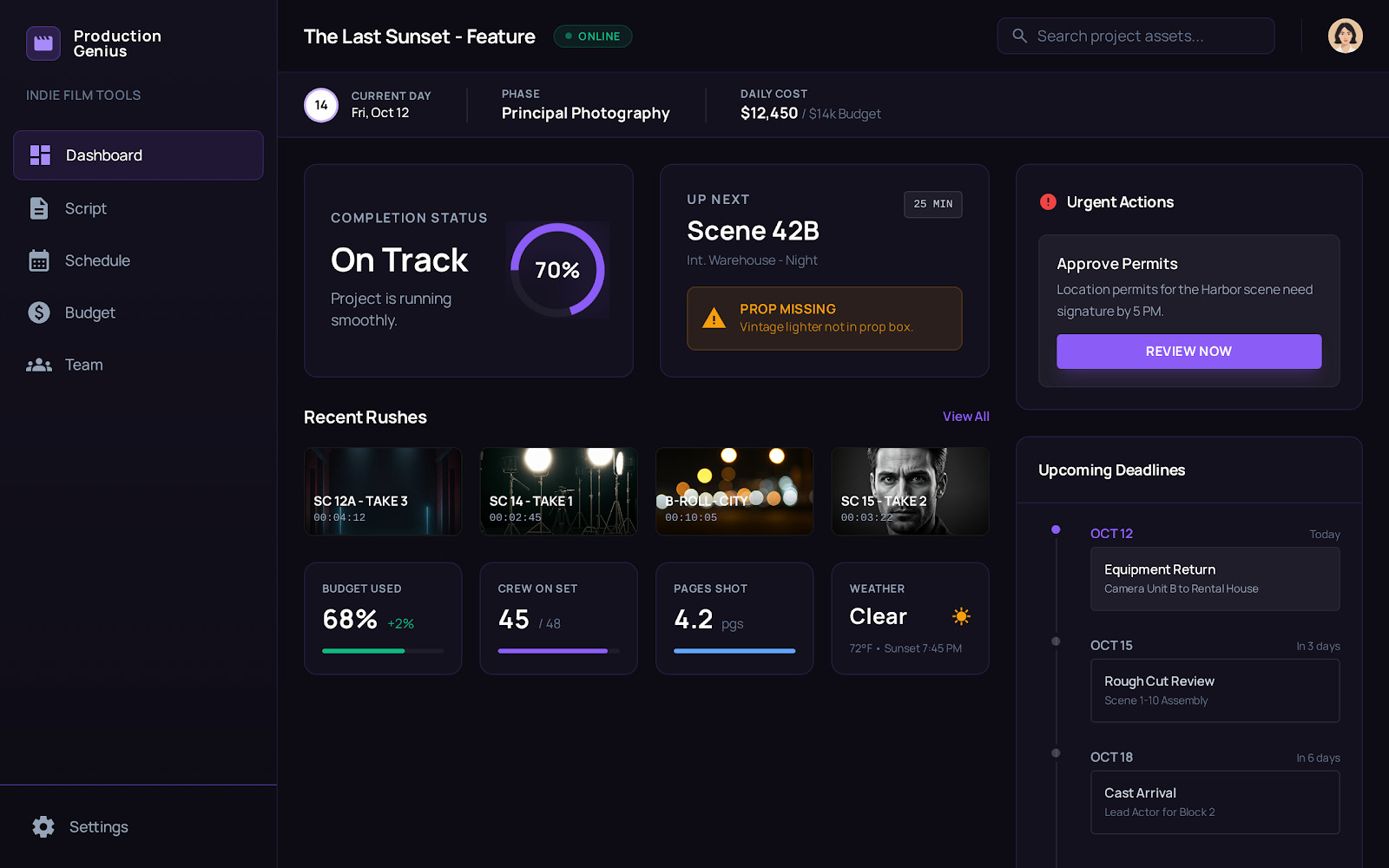
The production dashboard — completion status, next scene up, recent rushes, budget tracking, crew count, and upcoming deadlines in one view. A producer sees the entire state of the production without opening another app.
Data Model First. Everything Else Follows.
The complexity of a production management platform lives in the relationships. A scene belongs to a shoot day. A shoot day has assigned cast and crew. Cast members have availability, contact information, and characters they play. Videos belong to productions and are tagged to scenes and takes. Scripts have versions, comments, and distribution histories. Every entity connects to multiple others, and those connections are what make the product useful.
Before writing any UI code, I designed the complete data model — 20+ entities with their relationships, from productions and accounts at the top through scenes, scripts, cast, crew, media assets, budgets, tasks, and notifications. The information architecture mapped 19 top-level sections with full CRUD operations, version control for media and scripts, role-based permissions, and approval workflows.
User journeys were defined for three distinct personas: the crew member who needs their schedule and tasks, the producer/director who needs oversight of the entire production, and the studio executive overseeing multiple productions simultaneously. Each persona accesses the same data through different views, which meant the data model had to be flexible enough to serve all three without duplicating information.
Production Data Model
20+ EntitiesThe data model was designed before the first component was built. Every relationship — scene to shoot day, cast to character, video to scene and take — was defined upfront. The UI is a reflection of the data model, not the other way around.
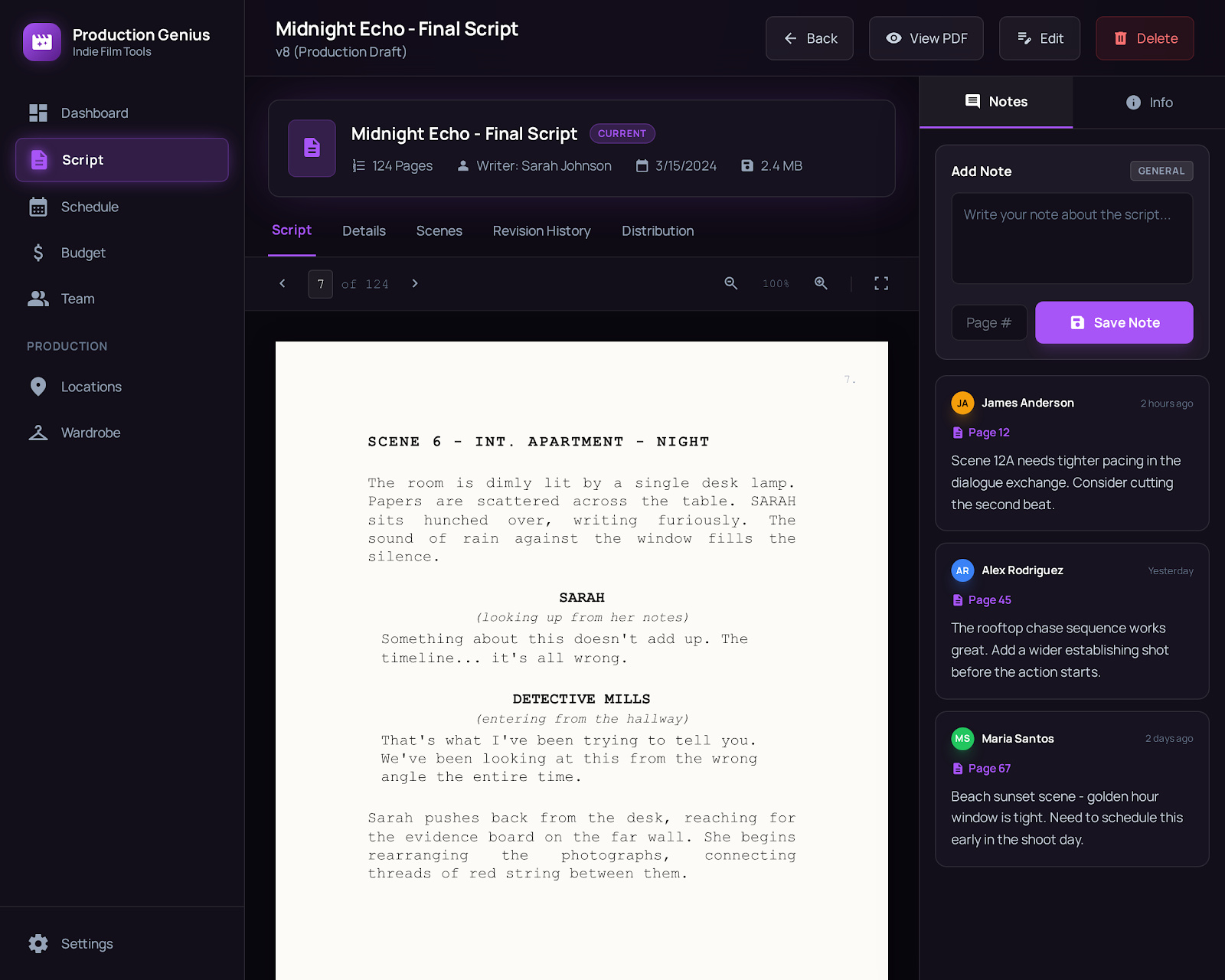
The script reader with page-level annotations. Team members leave notes tied to specific pages — the director comments on pacing, the DP flags a lighting requirement, the producer notes a schedule conflict. The script connects to scenes, which connect to shoot days, which connect to cast and crew.
Where the Orchestration Workflow Was Born
Production Genius is the project where I developed the AI tool orchestration workflow that now defines how I build every product. Not by planning it in advance — by building a complex application and discovering which tool worked best at each stage through trial and iteration.
The workflow emerged naturally. Claude for strategy and ideation — reasoning through the information architecture, the data model relationships, the user journey tradeoffs. v0 for production UI — generating polished, accessible React components with Tailwind faster than hand-coding them. Claude Code for integration — wiring pages to Firebase, connecting authentication, building API routes across multiple files simultaneously. Cursor for refinement — surgical fixes with full codebase context when Claude Code was too heavy-handed.
The insight that crystallized the methodology: the leverage isn't in mastering any single AI tool. It's in knowing which tool to reach for at which moment, and having the architectural documentation that lets each tool pick up where the last one left off. The data model, the information architecture, the user journeys — these artifacts aren't just design decisions. They're the context layer that makes AI orchestration work.
Five-stage workflow
Claude for strategy. v0 for production UI. Claude Code for multi-file integration. Cursor for surgical refinement. Claude again for code review. Each tool does what it's best at. None tries to do everything.
Architecture as context
The data model, information architecture, and user journeys travel between tools as markdown files. Each AI tool gets hydrated with the decisions made before it — no context fragmentation, no contradictory outputs.
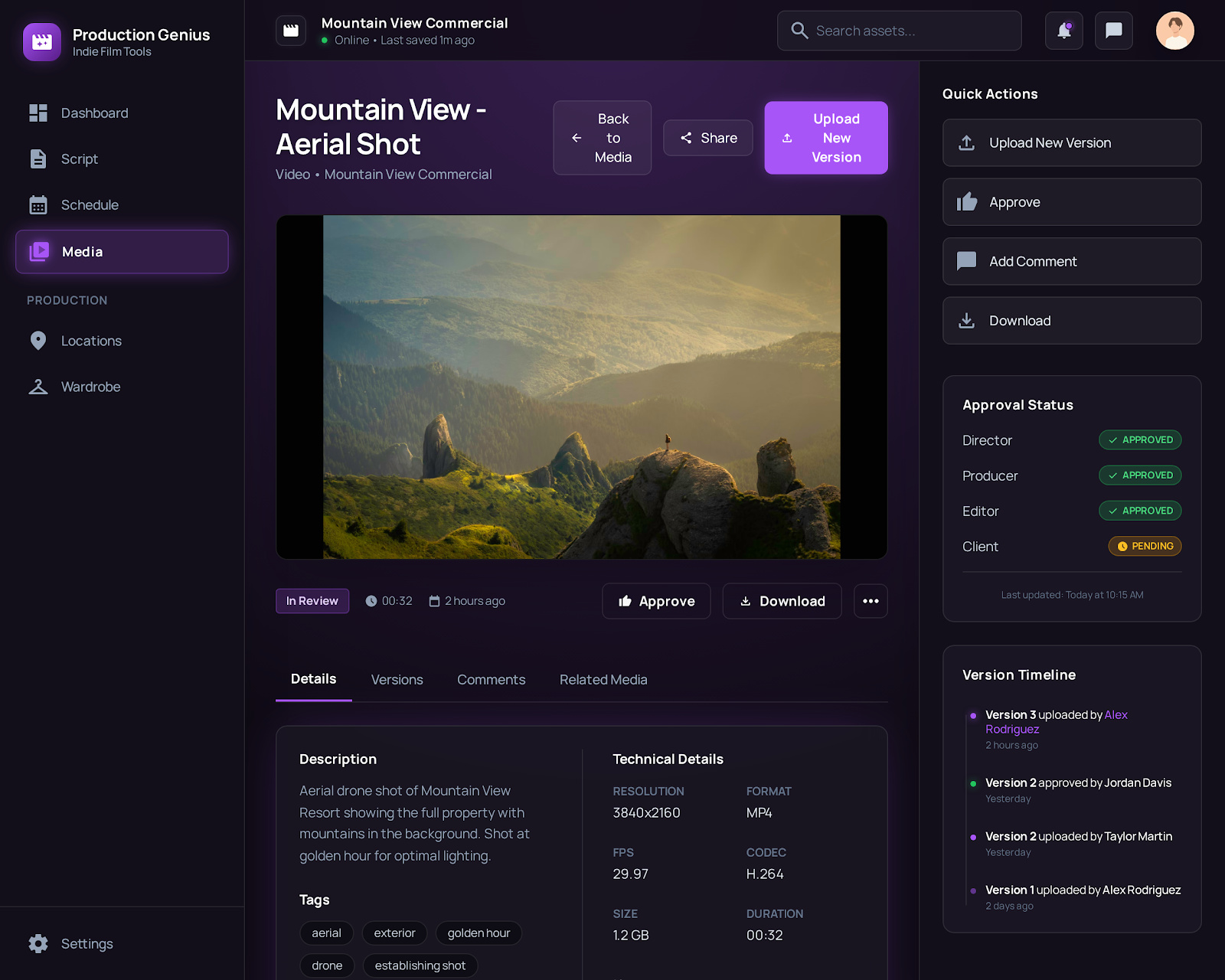
The media detail page — built through the orchestration workflow. Claude designed the approval workflow logic. v0 generated the player component and version timeline. Claude Code wired it to Firebase Storage with version control. Cursor refined the edge cases. One page, four tools, each doing what it does best.
The Full Production Lifecycle
Production Genius shipped as a complete production management platform. Teams create productions, upload and manage scripts with page-level annotations, define scenes with locations and cast assignments, manage cast and crew profiles with availability tracking, upload media assets with version control and multi-role approval workflows, track budgets, schedule shoot days, and distribute call sheets — all connected through the data model that ties every entity to every other.
The platform runs on the shared Next.js/Firebase template architecture that powers the entire product portfolio. Production Genius, Idea Genius, and the other products in the portfolio share 40% of their foundation — typography, spacing, component patterns, authentication — while each product owns its domain-specific 60%. This shared template is itself a proof of architectural thinking: design the foundation once, build products on top of it.
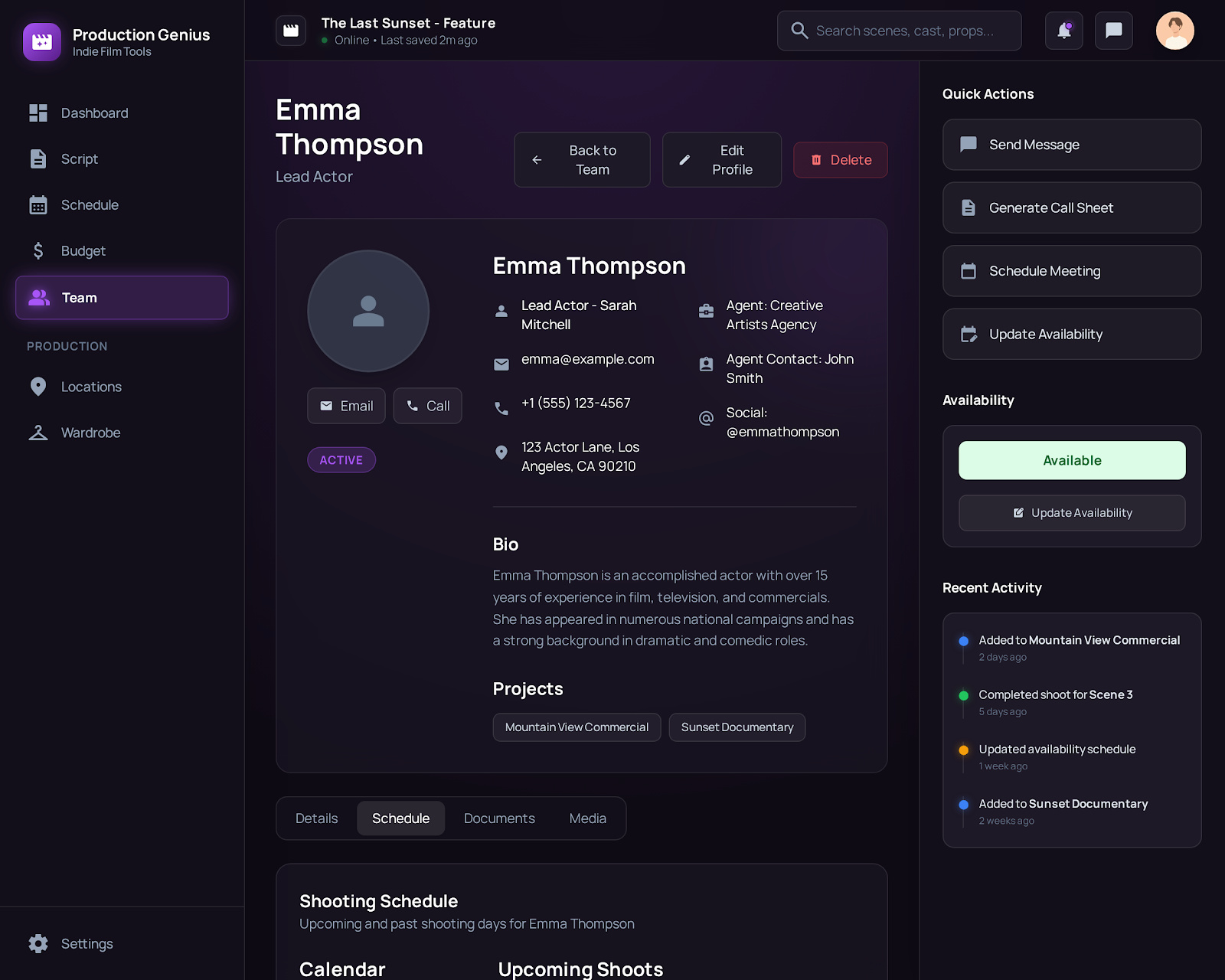
Cast profiles — contact information, agent details, character assignments, availability status, shooting schedule, and recent activity. Quick actions for messaging, call sheet generation, and scheduling.
Script management — upload, version, annotate, and distribute. Page-level notes from the entire team. Connected to scenes, shoot days, and the production schedule.
What Shipped
Scripts, scenes, cast, crew, media with version control, budgets, schedules, call sheets, approval workflows — and the AI orchestration methodology that built it all.